
IRIS Layout
IRIS Layout
Once loaded to the browser, the IRIS project website consists of three primary areas, or work spaces. These are :
- Maps
- Modules
- Dashboards
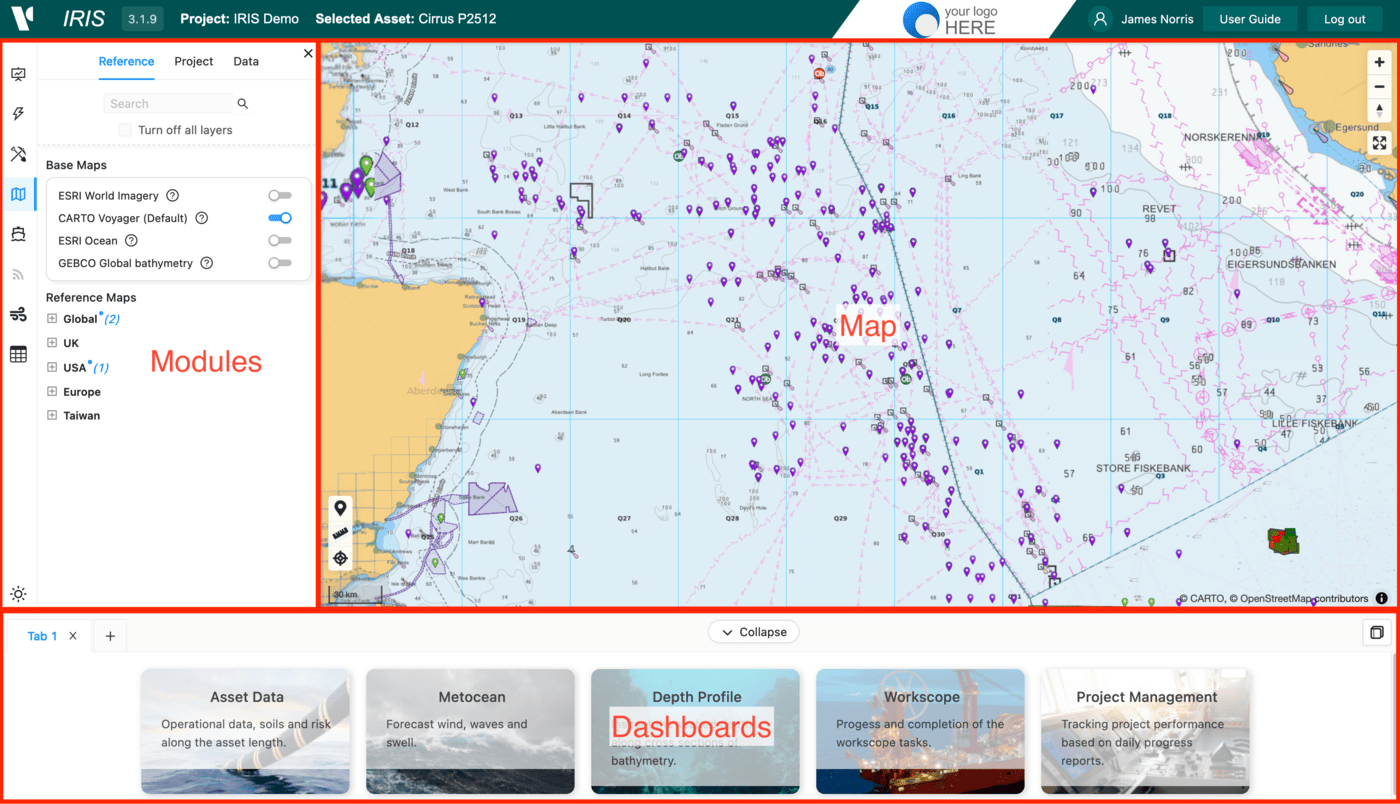
Driven by selections made within the Activities and Data modules, the Map window, presents a multi-layered GIS-style interface which presents mapping data, associated meta data and links to other data types such as documents, images and spreadsheets.
Modules allow users to input, access and configure data that resides within the IRIS environment. A user will have access to the standard set of modules, together with additional relevant modules based upon the permissions associated with the assigned user credentials. Available modules include :
- Projects
- Assets
- Activities
- Data
- Vessels
- Live Data Feeds
- Metocean
- Data entry
- Cost
- Points of Interest
Dashboards provide for further visualisation, assessment and analysis of IRIS datasets through the production of graphs, reports and data exports. Available dashboards include :
- Asset Data
- Metocean
- Depth Profiles
- Cable Installation
- Project Management
- Costs
Dashboards are accessed in one of two ways. Primarily, selecting the Dashboard expand button beneath the main map window to reveal the available Dashboards. You can drag the window vertically to provide more space for your dashboard of selected the double arrow icon to expand to full screen. Simply click of the your required Dashboard to initiate it. Occasionally you will find that a dashboard may become immediately initiated directly from a selection or option from within an associated module.
Where applicable, intuitive interaction between the 3 work spaces allows the user to use the prism of the web map to further support the visualisation of data being addressed within modules and dashboards.
Light / dark mode
BY default, IRIS starts with a white background across the majority of the map, dashboard and module space. IF you prefer a black background, simply toggle the moon / sun icon at the bottom of the Modules vertical bar
IRIS version number
The IRIS build version number is shown on the top left hand side of the IRIS work space window. The current major release of IRIS is IRIS 3, represented by the first numeral. The following two numbers represent major and minor code releases. A history of related features, functionality and system maintenance is provided within the IRIS user guide. Additionally, when a new version of IRIS is released, the user is notified at the next login process.