
IRIS Handheld Iridium Tracker Installation Guide
VG Tracker Set Up
S&G supplies its Client Representatives with global tracking units intended to be operated onboard supported vessels. The units measure GPS positions which are telemetered in real time via Iridium to IRIS, nominally every hour. Position accuracy is generally better than ±5m. The IRIS team can configure most things remotely once initial setup is complete.
Applicable Devices
- YB Tracking ‘Yellow brick’ (V3 MKII or MKIII)
- Rock Seven ‘Rockstar’
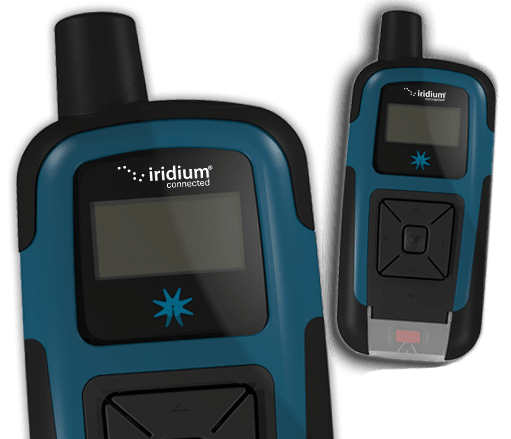
Kit Contents
- 1 x tracker device
- 1 x pelicase
- 1 x international USB charger
- 1 x USB A to mini B cable
- 1 x mounting pouch
- 1 x secondary retention strap
Installation & Operation
- Verify kit contents & unit NOT ACTIVE prior to departure from home – top up battery to 100%
- Request permission and agree installation location with vessel crew – aim for low risk non-PPE / permit area preferably with limited obstruction.
- Perform and document risk assessment for installation – using VG SafeSTART TRA, or vessel based equivalent
- ACTIVATE unit – hold down ok to start
- Click ok to enter main menu
- Scroll down and enter tracking menu
- Ensure status is set to ‘on’
- Ignore manual report function
- Ignore history function
- Ensure report freq set to 1hr (standard VG default, hz configurable remotely as required)
- Ignore burst settings
- Ensure activity sense is off
- Come out of tracking menu – ignore all other sub menus
- Click left arrow back to home screen
- Install unit – ensure secondary retention fitted (measure mounting offsets as required)
- Check unit (using up arrow) until a successful position transmission can be verified
- Notify IRIS support by email that unit is installed & operational (relay any offsets as required)
- Perform project - monitor battery status daily and consult with IRIS support if drops below 50%
- Complete TRA to recover the unit
- Request permission to recover the unit from vessel crew
- Recover unit
- Enter main menu
- Scroll all the way down to deactivation
- Are you sure?
- Click ok
- Screen says NOT ACTIVE
- Pack unit away (there is no actual power off switch – it just goes to sleep itself when deactivated)
- Confirm all items present and correct as per kit contents, ensure unit NOT ACTIVE prior to travel
- Confirm unit demob / forwarding instructions with Vysus Group